
Edit data
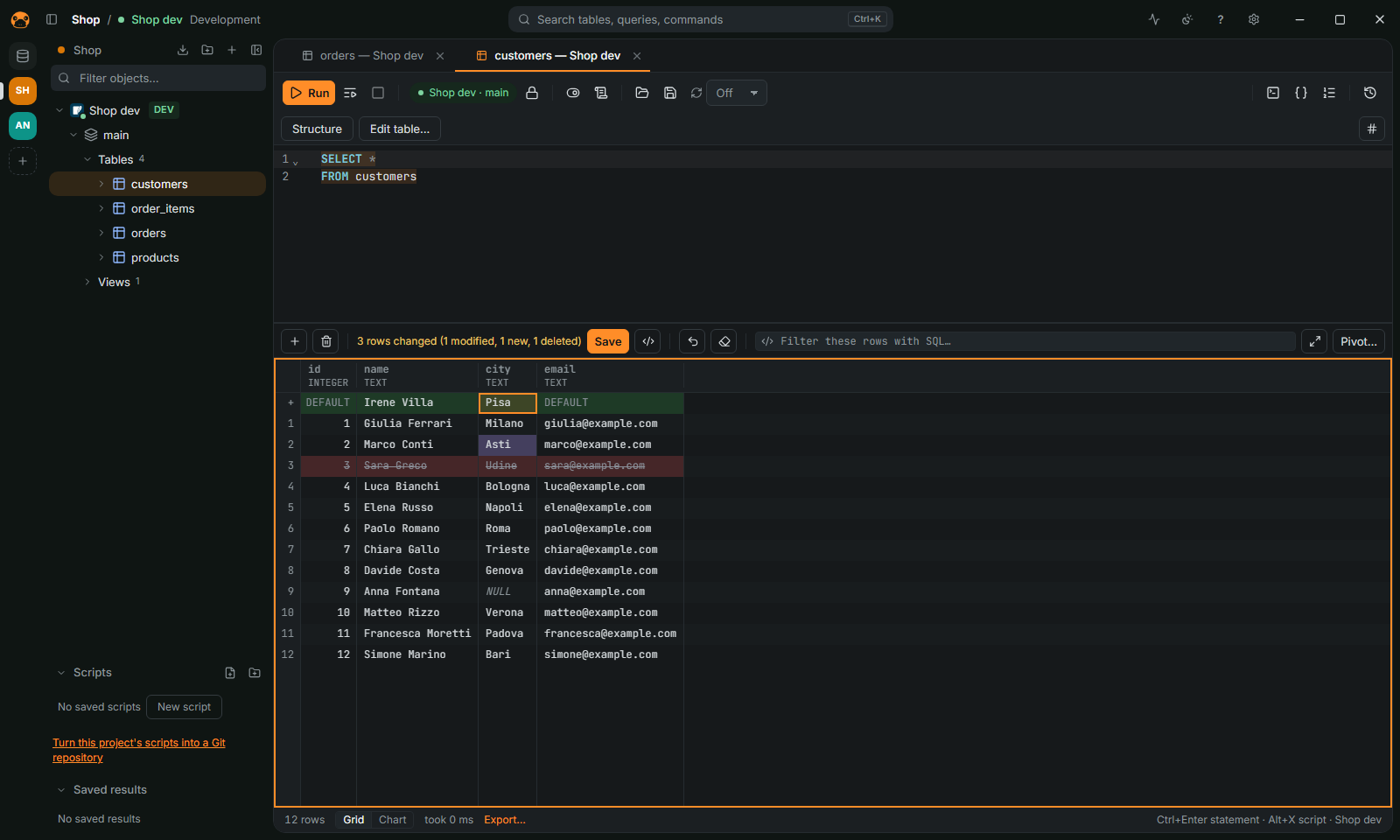
Change rows in the grid
- Open a table from the navigator, or run a query that reads one table.
- Double-click a cell, press
F2, or just type, to change it.Shift+Deletesets the selected cells to NULL. Insertadds a row,Ctrl+Dduplicates the selected one,Deletedeletes it.- The changes stay highlighted until you save. Use Preview SQL to read the statements.
- Press
Ctrl+S(or Save changes) to save all of them, or nothing if one fails.Ctrl+Zundoes the changes not saved yet.
Every save leaves an undo script that puts the rows back. In manual-commit mode the changes join the open transaction.
When the grid is read-only
A table needs a primary key, or a unique key on non-null columns, or a virtual key you pick; otherwise the grid says why it cannot be edited. A connection can also forbid data editing (Appearance and safety page of its settings): rows then change only by SQL.
Edit documents, keys and rows without SQL
Redis, Elasticsearch, Cassandra and MongoDB results are edited too, with their own commands instead of SQL: Preview SQL shows them. On MongoDB the result of a plain find on one collection is editable by _id. Each change is one updateOne, insertOne or deleteOne, written with the BSON type of the column; a changed number keeps the numeric type the document stores when that type holds it exactly. Editing _id, columns of mixed types and fields with a . in their name are refused, with the reason. On a replica set a save is all or nothing; on a standalone server the commands run one after the other and the error says how many were saved. See MongoDB.
Edit many cells at once
Select the cells and use Edit selection in the grid menu: one value, NULL or DEFAULT in every cell, find and replace in the text cells, or a number sequence. Ctrl+Alt+D fills down from the first row (⌃⇧D on macOS). Only the rows loaded in the grid change, and the result is pending changes you preview, save or undo together.
Paste from a spreadsheet with Ctrl+V over the cells, or Ctrl+Shift+V as new rows.
Load a file into a cell
From the grid menu, or the … button of the cell editor: bytes go into binary columns and UTF-8 text into text columns. Files over 50 MB ask first; files over 200 MB are refused.
Rows proposed by an agent
When an agent calls propose_edits, the table opens in its data viewer with the proposed rows as pending changes, colored like yours. Nothing is written until you save them; discard them to refuse. See Agents.
More
Foreign keys, arrays, the table editor (columns, keys, indexes) and fake data are in FEATURES.md. Production connections confirm every change first: see Safety.